Clone Viral TikToks with AI Avatars & Auto-Post to 9 Platforms
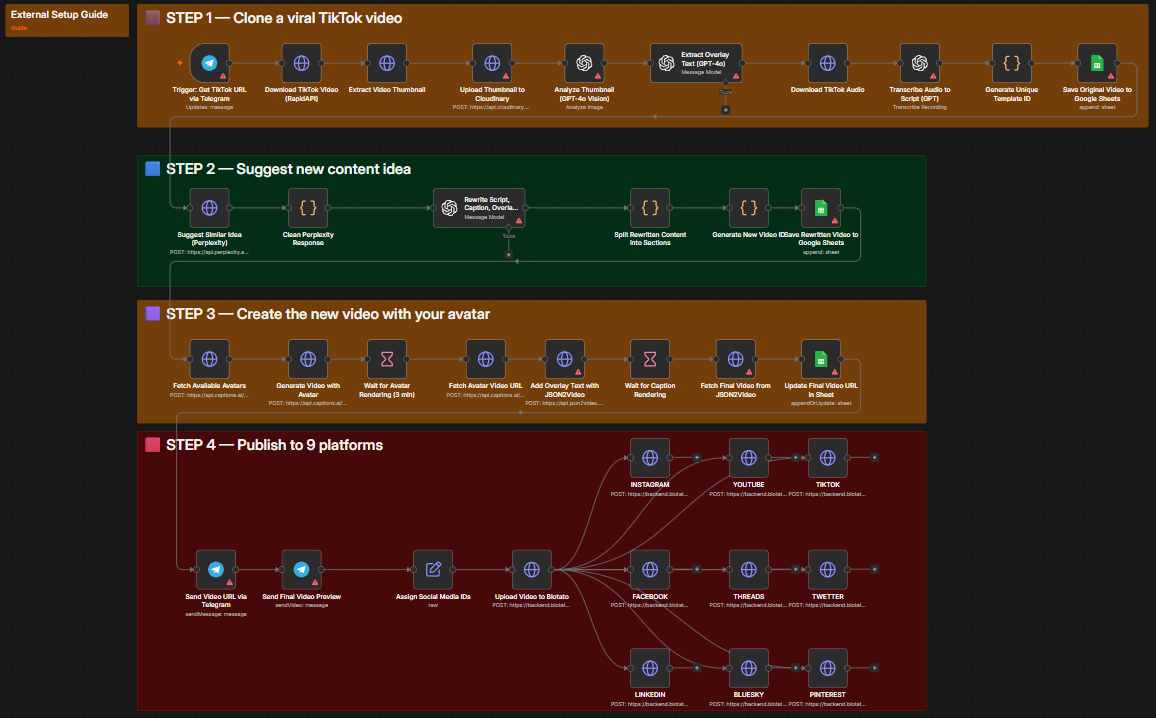
A 4-step n8n workflow that downloads any TikTok via Telegram, analyzes it with GPT-4o Vision, generates a fresh content angle using Perplexity AI, recreates the video with a Captions.ai avatar, and auto-publishes to Instagram, YouTube, TikTok, Facebook, Threads, Twitter/X, LinkedIn, Bluesky, and Pinterest via Blotato.
Free download · enter your email · 12 months of updates
How it works
4 steps, fully automated
Every step is a discrete n8n node — observable, retryable, and replaceable without touching the rest of the workflow.
Clone Viral TikTok
Send any TikTok URL to your Telegram bot. The workflow downloads the video via RapidAPI TikTok Download, extracts the thumbnail, uploads it to Cloudinary, and uses GPT-4o Vision to analyze the thumbnail and extract overlay text and captions from the original post.
Telegram trigger · RapidAPI TikTok Download · Cloudinary · GPT-4o VisionSuggest Fresh Content Idea
Perplexity Sonar Reasoning researches a fresh topic in the same niche. The new angle matches the original format and length but delivers unique value. GPT-4o rewrites the script, caption, and overlay text — keeping structure identical while refreshing the topic.
Perplexity Sonar Reasoning · GPT-4o script rewriting · Google Sheets loggingCreate Video with AI Avatar
Captions.ai fetches your available AI avatars and generates a new video using the rewritten script. After a 3-minute render, JSON2Video enhances the video with text overlays and auto-generated captions — producing a finished, branded short-form video.
Captions.ai Creator API · JSON2Video overlay + subtitles · 3-min render waitPublish to 9 Platforms Simultaneously
The final video is uploaded to Blotato and simultaneously published to Instagram, YouTube, TikTok, Facebook, Threads, Twitter/X, LinkedIn, Bluesky, and Pinterest — all with the AI-generated caption. The final video URL is sent back to your Telegram chat.
Blotato API · 9 platforms · parallel posting · Telegram confirmationRequirements
What you need to run it
Every integration below is required to run the full workflow. Most offer free tiers sufficient for testing.
Telegram Bot
Triggers the workflow by receiving a TikTok URL. Sends back the finished video URL and caption when publishing is complete.
Get started at core.telegram.orgRapidAPI TikTok Download
Downloads TikTok videos without watermark via the tiktok-download-video1 RapidAPI endpoint.
Get started at rapidapi.comCloudinary
Stores and serves thumbnails for GPT-4o Vision analysis. Handles file uploads throughout the pipeline.
Get started at cloudinary.comOpenAI GPT-4o
Vision analysis for thumbnail reading and overlay text extraction. Also rewrites scripts, captions, and overlays in the original style for the new content angle.
Get started at openai.comPerplexity AI
Sonar Reasoning model researches fresh, relevant content ideas in the same niche as the original TikTok using real-time web data.
Get started at perplexity.aiCaptions.ai
AI avatar generation — submits the rewritten script and renders a new talking-head video using your chosen creator avatar.
Get started at captions.aiJSON2Video
Adds text overlays and auto-generated subtitles to the avatar video for professional short-form video quality.
Get started at json2video.comBlotato
Multi-platform publishing API that simultaneously posts to all 9 supported social networks with a single API call.
Get started at blotato.comUse cases
Who this workflow is for
The workflow adapts to any team or stack. Below are the most common deployments.
Social media agencies managing multiple client accounts
Content creators scaling output without extra filming time
Brand accounts maintaining consistent cross-platform presence
E-commerce stores repurposing competitor viral formats
Course creators systematically cloning educational viral content
Setup
5 steps to go live
From zero to running automation. A self-hosted or cloud n8n instance is the only infrastructure you need.
Import the workflow into n8n
Download the JSON file from Twarx. In your n8n instance, open Workflows → Import from file, and upload the JSON. All nodes and connections import automatically.
Add your API credentials
Configure credentials for: Telegram Bot (token + webhook), RapidAPI (TikTok Download key), Cloudinary (API key + secret), OpenAI API key, Perplexity API key, Captions.ai API key, JSON2Video API key, and Blotato API key.
Configure your social media account IDs
Open the "Assign Social Media IDs" node and enter your Blotato account IDs for each platform — Instagram, YouTube, TikTok, Facebook, Threads, Twitter/X, LinkedIn, Bluesky, and Pinterest (including Pinterest board ID and Facebook page ID).
Set up your Google Sheet
Create a Google Sheet with two tabs: "Template" (original video data) and "MA VIDEO" (rewritten videos + URLs). Connect the sheet ID to the Google Sheets nodes in the workflow.
Send your first TikTok URL
Message your Telegram bot with any TikTok URL. The workflow downloads it, creates a new video, and posts to all 9 platforms. You receive the final video URL in Telegram when complete.
Related
More workflows
Get started
Ready to automate?
Download the workflow JSON for free and import it into n8n. Need implementation help? Contact the Twarx team for a free consultation.